Wednesday, March 16, 2011

Japan:sorter days and a little wobble

Thanks to Gizmag

Using a complex model to perform a theoretical calculation based on a U.S. Geological Survey, Richard Gross of NASA's Jet Propulsion Laboratory (JPL) has determined that by changing the distribution of the Earth's mass, the earthquake that devastated Japan last Friday should have sped up the Earth's rotation, resulting in a day that is about 1.8 microseconds (1.8 millionths of a second) shorter.

The calculations, which will likely change as the data on the Japan quake is further refined, have also been used to examine the effects of other recent quakes. Gross estimated that last year's 8.8 earthquake in Chile shortened the length of a day by about 1.26 microseconds, while similar calculations revealed the 9.1 magnitude Sumatran quake of 2004 shortened the day by 6.8 microseconds. Just how much an earthquake affects the Earth's rotation depends on the magnitude of the quake, its locations and details of how the fault slipped.

Gross's calculations also indicate the Japan quake should have shifted the position of the Earth's figure axis by about 17 cm (6.69 in), towards 133 degrees east longitude. Not to be confused with the Earth's north-south axis, the figure axis is that about which the Earth's mass is balanced. While the slight shift will cause the Earth to wobble a bit differently as it rotates, it won't cause a shift of Earth's axis in space, which can only be affected by external forces such as the gravitational pull of the sun, moon or planets.

Gross points out that the changes to the Earth's rotation and shift of its axis aren't anything to be worried about. "Earth's rotation changes all the time as a result of not only earthquakes, but also the much larger effects of changes in atmospheric winds and oceanic currents," he said. "Over the course of a year, the length of the day increases and decreases by about a millisecond, or about 550 times larger than the change caused by the Japanese earthquake. The position of Earth's figure axis also changes all the time, by about one meter (3.3 feet) over the course of a year, or about six times more than the change that should have been caused by the Japan quake."

Although scientists are able to measure the larger effects of the atmosphere and ocean on the Earth's rotation, the changes due to earthquakes have been too small to measure as the computed change in the length of a day caused by earthquakes is much smaller than the accuracy with which scientists can currently measure changes in the length of a day.

However, the effects from the 9.0 magnitude Japan quake, which is the fifth largest since 1900, may actually be large enough for scientists to observe. This is because the position of the figure axis can be measured to an accuracy of about five cm (two inches), so the 17 cm shift from the Japan quake may be observable if the scientists can adequately remove the larger effects of the atmosphere and ocean from the equation.

Friday, February 25, 2011

PLEASE COMMENT

PLEASE COMMENT PEOPLE

An Android Tablet To Keep You Buisy

9 people liked this
Motorola Xoom Tablet The first tablet on the market with Android's 3.0 Honeycomb tablet OS
The first real iPad challenger enters the ring

We've been anxiously awaiting the Motorola Xoom's arrival ever since we groped it at CES. The first dual-core tablet! The first tablet to use Android's tablet-only Honeycomb OS! The first Android tablet that doesn't immediately make us think "look at that giant phone"! And, yeah, the first legitimate iPad competitor, period. What we found was a great tablet--not a "promising" product, but a tablet that is seriously fast, fun to use, well-designed, and very pretty (when was the last time you heard "pretty" applied to an Android device?).

What's New

The 10-inch Xoom is both the first tablet to hit stores that runs the Honeycomb version of Android, which Google has designed specifically for larger screens, and the first boasting a dual-core processor (Nvidia's Tegra 2) to handle heaps of tasks at once. (This will become the standard soon; BlackBerry's Playbook and likely the next iPad will also have dual-core processors.) Google has shown off the Xoom as the flagship of this new generation of Android devices: the first true Android tablet, running the first true Android tablet OS.

What's Good

Google Apps: We already knew that Google was pushing panel-based app formatting for Honeycomb, so their suite has to set a strong example (sometimes to its own detriment, but more on that when we talk YouTube later on). When you first open Gmail, for instance, it may look just like it does in iOS, but the experience is much more seamless. In message view, the left-most column of the screen houses a list of items in a folder (say, your inbox), while the right two-thirds displays an expanded, threaded conversation view; if you ask me, the Honeycomb format trounces even web-based Gmail. In both Mail and Gmail accounts, the main folder-view allows you to drag-and-drop messages in and out of folders. The Maps app has a similar layout; instead of imposing a search pane and results over the entire screen (as in cellphone Android), it keeps a list of place entries to the leftmost third of the screen, so you can see a snapshot of the location and its, well, location, side-by-side, just as you would on the web.

Notifications and Settings: Honeycomb has taken the notifications bar from the tippity top of the screen and moved it down to the lower righthand corner. From here, no matter what app you're in, you can see when there's any activity anywhere else on the device. A new Google Talk message, for example, pops up in its own small box alongside a thumbnail image of whoever sent it. The same goes for emails and tweets, though they're accompanied by the app logo, instead of a face, and it's a nice use of the larger screen real estate compared to a smartphone.

Tapping the digital clock opens a full list of notifications, and lets you delete them one by one or as a group. From this window, you can also access all the system settings, something which you (annoyingly) could only do from the homescreen before.

Recent Apps and Multitasking: Beside the virtual Home and Back buttons, which persistently appear at the bottom-left corner of the screen, is the Recent Apps list, which expands into a stack of the last five apps used alongside a thumbnail of the last screen you were on. This column made toggling between apps almost instantaneous; I, for example, hopped quickly between Maps (where I was hunting for a nearby restaurant) and an email--a task which would have taken a healthy amount of double-clicking the home button on an iPad to accomplish.

Widgets: I've always found widgets on smartphone Android to be too overwhelming for the small screen. To get any useful at-a-glance information from, say, your Twitter feed, the widget itself must bogart an entire homescreen. Not so in Honeycomb, which Google has positioned as a champion of widgetry. YouTube thumbnails, my Twitter feed, tiled Web bookmarks, and the native music player all fit comfortably on one pane, saving the time of toggling through apps for recent updates and instead presenting them all at one quick glance.

Keyboard: The on-screen keyboard is as close to a match for the iPad as I've ever used. The keys are well spaced and plenty large. My only complaint would be that the Alt options are only available on a handful of punctuation keys; rather than a long-press on the Q to pull up the numeral 1, you have to switch back and forth between views--a trick Honeycomb should have borrowed from its immediate Android predecessor FroYo, for sure.

Camera: The camera refresh in Honeycomb is long overdue. When using the rear-facing camera, the captured image takes up about two-thirds of the screen, with the image controls remaining handy on the right, letting you adjust white balance, flash, color palate and scene modes without bouncing in and out of pop-up menus. One click (or tap, or whatever) also swaps between the rear-facing five-megapixel sensor and the front-facing two-megapixel sensor.

Tabbed Browsing: Waiting for a Chrome tablet? Here's a worthy substitute. If you know the Chrome browser, you know what's going on here. Honeycomb's web browser is delightfully powerful, a supercharged version of the Android browser that has much more in common with the desktop Chrome browser than Google's previous mobile efforts. You can keep several tabs open simultaneously, including "incognito" tabs that keep your history private. I was sure when I opened the New York Times, CNN, ESPN PopSci.com and others all at once that there would be substantial lag when toggling from window to window, but that was happily not the case. It also syncs with your Chrome bookmarks and automatically logs into the primary Google account on the Xoom, so you can hop right into any Web apps.

Button-less-ness: Google has touted Honeycomb as a button-free experience, which made me skeptical at first (I like the one-click-to-home on the iPad and other iOS devices), but I was quickly proven wrong. In video playback, for one, there's nothing to see but screen; and it only takes a quick tap on the lower or upper edges to pop the navigation and menus back up. The same goes for reading ebooks: ain't nuthin' but the page in front of you. There is one physical key, though, it's just not on the face; in fact, the placement of the power/lock button on the upper-left corner of the device's back is unusual but near-perfectly placed, right where your pointer finger falls when gripping the slab.

Xoom Hardware: Honeycomb aside, the Xoom is the most well-thought-out tablet I've ever tinkered with. Aside from the placement of the lock key ('cause you already know how I feel about that), Motorola has paid plenty of attention to usability and lifespan. While it ships as a 3G and Wifi device, a SIM card slot on the top will allow it to connect to ultra-fast 4G once the Verizon LTE network rolls out later this year. Its memory is also expandable up to 64GB via microSD card (it ships with a hefty 32GB). Its dual-core 1GHz Nvidia Tegra 2 processor is also well up to the challenges presented by multitasking media; I never noticed as much as a blip in any of my playback or load times, and everyday use was buttery smooth.

What's Bad

Too Much Clicking: Honeycomb relies more on the user to do the navigating than iOS does. I found myself endlessly back-clicking in and out of screens (if I left the Gmail app while changing its preferences, hopping back to Gmail from the homescreen or another app would drop me off at the preferences screen, not the inbox), and Honeycomb leaves all the decisions about what to see completely up to the user--something that's especially a drag when trying to play back video.

The most prominent example is the YouTube app: At first glance the Honeycomb YouTube channel blows the iPad out of the water, presenting a circular gallery of the most popular and top-rated clips. Click though into any of those videos, though, and the shine starts to come off the apple; rather than taking advantage of its screen size (and processing oomph) and launching a fullscreen video, Honeycomb's pages instead feel more like YouTube's website; the video is tiled in a three-inch box in the upper-lefthand corner, with metadata below and related links to the right. It takes an extra click to explode into fullscreen, even though that's what most users would want to happen. (It's worth noting that clicking an embedded YouTube video while browsing the web does not show this behavior--the video immediately starts playing in fullscreen.)

I also sometimes found it tricky to figure out how to adjust various settings within apps. There are multiple places where you might find the buttons to let you do things--there's the taskbar at the top of the screen, which changes not only app to app but also within apps depending on what you're doing, but there's also a menu button that pops up on the bottom every once in awhile, and then there's the ability to long-press sometimes but not other times. It never confused me for too long, but there are definitely times when you think, "Now how do I do this...?"

Desktop Sync: There's still a lot about Honeycomb that feels manual next to iOS, with desktop syncing being a perfect example. Despite the refresh to the tablet music interface, the desktop client experience is still clunky, though admittedly easier than previous Android versions. A quick download of the Mac-only Android File Transfer software led to nothing more than a directory of folders living on our Xoom. Syncing libraries then became a long game of drag-and-drop in 4GB chunks. The control of putting files only where you want them is nice, but babysitting it, not as much. We'll admit, we're spoiled by the autonomy iTunes takes on, syncing files on its own in the background. It's likely that third-party solutions, like the media software DoubleTwist, could make this a less manual experience.

Apps: Android tablets need Android tablet apps. Hopefully, that'll come in time, but at the moment, there are precious few apps (and the continued absence of a Netflix app) in the redesigned Honeycomb Android Market that are expressly designed for Honeycomb. Not even major apps like Facebook, Kindle, and Twitter are ready, which makes the platform as a whole feel slightly half-baked. Regular Android apps work on the Xoom, but as any iPad owner who's tried to run an iPhone app will tell you, it's not a particularly fun experience. Smartphone Android apps look zoomed-in and blurry on the Xoom, and require the use of the Menu button that's mandatory on Android phones but has been eliminated from the Xoom. (Luckily, Honeycomb can just add a virtual menu button next to Home and Back, but it's still awkward and inconsistent with the rest of Honeycomb.) It's unfair to brand the Honeycomb app situation "bad," since the thing hadn't even hit the market at time of testing, but it's something about which customers need to be aware.

The Price

$600 with a two-year contract with Verizon ($800 without), which bests the $730 unsubsidized price of a 32GB iPad. Monthly data access starts at $20 for one gigabyte.

The Bottom Line

It's only logical to think that Android converts will feel at home in Honeycomb (rhyme scheme not intentional), but all told, it may do enough to tempt iPad lovers, too. What makes Honeycomb, and thus the Xoom, stand apart from its daunting competitor is its potential to stand on its own. iOS is inherently dependent on having a desktop companion, while Android 3.0 pulls nearly all its info from the cloud. In the one evening I had to spend with the Xoom before posting these impressions, I didn't open my laptop once, nor did I need to. I sat, perched comfortably on the couch, replying to email, coordinating dinner plans, watching videos and reading blogs-all without connecting to a computer. Plus, the microSD expansion slot and easy access to the filesystem, along with the cloud capabilities and multitasking abilities, help make the Xoom feel much more like a possible laptop competitor than the iPad. Whether it can replace a laptop entirely is a question that will take much more time to answer than we had with the Xoom, but it feels more up to the task than the iPad, at least.

Oops Sorry, there are no spaceships left

4 people liked this
Discovery Reflections Discovery sits on the launch pad ahead of of its 39th and final voyage to space. NASA
No 'mass exodus,' but hard choices ahead for U.S. astronaut corps

Instructed by his father, 9-year-old Jose Hernandez marched up to the family television set to wriggle the rabbit-ears antenna, hoping to sharpen the black-and-white image of American men walking on the moon. It was December 1972, during Apollo 17, and Hernandez was transfixed.

"I would go outside, look at the moon, and come back inside and look at the images on TV. I remember being all of 9 years old and telling my parents, ‘That's what I want to do when I grow up,'" he recalled. And he did it. He became an engineer and applied to be an astronaut 12 times before he finally made the cut in 2004. Then he made just one trip to space before hanging up his flight suit for good last month.

It wasn't because he'd realized his dream and moved on. It was because there was nothing in this country for him to fly.

Hernandez could have stayed in the astronaut corps and trained to fly on the International Space Station, but the commitment was just too much. The post-shuttle astronaut training regimen involves six-week jaunts to Japan, Canada, Russia and Europe over two and a half years, and then a six-month stay on the ISS. Hernandez chose to stay in Houston with his wife and five kids.

"I had to make a decision, so I chose for the sake of the family to leave NASA," he said. He said people might have asked why a father of five became an astronaut in the first place, given the arduous training and long absences.

"My answer would be, I didn't expect to be called to Russia," he said.

Including Hernandez, five veteran astronauts have left NASA since August 2010. Linda Godwin and Scott Altman were the first of the wave, departing in August. Godwin retired and Altman went to work for a firm called ASRC Research and Technology. In December, Alan Poindexter left the agency to return to the Naval Postgraduate School in Monterey, Calif., where he will serve as dean of students. And Jan. 3, Marsha Ivins retired.

As NASA prepares for space shuttle Discovery's 39th and final flight today - with just two more shuttle flights left - current and former astronauts wonder whether more of their colleagues will move on, with no prospects of an American spacecraft for many years.

When Leroy Chiao was selected in 1990, leaving the space agency was the last thing he imagined, he said. He attended a retirement party during his first week of astronaut training and couldn't fathom why anyone would walk away. He was 8 when he watched Neil Armstrong step onto the lunar surface, and like Hernandez, he dreamt of becoming an astronaut. But 15 years later, things changed.

Chiao flew on three shuttle missions and once on a Russian Soyuz, after which he commanded the International Space Station for six and a half months. When he got home, he realized he was done.

"Especially after having flown and lived on the ISS, it was kind of like eating a big meal. I was full. It was great, I had a wonderful experience, but it was like, ‘You know what, it's time to go do something else,'" he said. He left NASA in December 2005.

Both Chiao and Hernandez added that they wanted other astronauts to have a chance to fly.

"I didn't feel bad that I was leaving (NASA) in dire straits. I think we have enough astronauts and not enough slots for them to fly," Hernandez said. "In a way I think I'm doing them a favor in alleviating the numbers, and I get to enjoy my family."

Hernandez's class was the last astronaut group that applied with the expectation of flying at least one shuttle mission before the program ended. But the candidates were still asked about their post-shuttle ambitions during the interview process, he recalled.

"We got a call asking would we still be interested in being astronauts if the shuttle program got canceled. In 2004, I said yes, I'm still interested. If I had to train for a station flight, I'm more than willing to do that. But 7 years later, circumstances change," he said.

The class of 2009 was the first group to be chosen without a dedicated spacecraft for them to fly. When the candidates were announced, the Constellation program was slated to begin in 2015, meaning there would be a five-year gap between the shuttle's retirement and the debut of its replacement. Now it's even longer than that, with Constellation relegated to the dustbin and the future of American spaceflight resting on the shoulders of the private sector.

Before he announced the new candidates, Johnson Space Center Director Michael Coats said he had worried the uncertainty would deter astronaut candidates from applying. But NASA still received 3,564 applications from pilots, engineers, scientists and teachers - all of them fully aware they would not fly on the shuttle and would rely on Russian Soyuz craft to get to the space station. The new class is taking intensive Russian language lessons as part of their training.

Hernandez said the new candidates were fully aware when they applied that the shuttle program would be ending soon, and they willingly signed up for space station-based missions.

"But for my class and other classes, it's fair for them to consider whether they want to fly station missions," he said. "I really don't think they're thinking, ‘I'm not going to get a spaceflight‘ - it comes down to a lifestyle. When we trained for a shuttle mission, most of the training, 95 percent of it, was here in Houston. At the end of the day we went back home to our families."

So what do you do next when your resume says "space shuttle trip?"

Chiao struck out on his own, working as a consultant, college professor, motivational speaker and wrangler of twin 4-year-old girls. He also served on the Augustine Commission, tasked with setting a new course for NASA, and which recommended scuttling the Constellation program. He supports developing the Orion vehicle, but he also supports commercial spaceflight development - he's a consultant for private ventures hoping to build their own spacecraft, and he believes he may even return to orbit someday aboard one of them.

Hernandez went to work for MEI Technologies, a Houston-based technology firm that has worked with NASA and with other aerospace companies. He wants to grow the company and serve as a role model to other young Americans, especially Hispanic Americans, he said. His first day was Jan. 31.

Neither expects a mass astronaut exodus, because everyone knew the shuttles had to retire at some point. Transitions between programs are always difficult, Chiao noted - it was hard for the astronaut corps who bridged Apollo to Skylab to the shuttle program, he said. Granted, this is a much longer gap.

"I feel for these guys; they were told they wouldn't fly on the shuttle, they would fly on the next vehicle, and they're watching the shuttle wind down and they have no idea when they're going to fly," Chiao said of the 2009 class. "By timing they can't control, they came in at a time of transition which results in all this uncertainty."


On the other hand, they know they'll get to space somehow, on Russian rockets or privately developed spacecraft.

"If I were one of these guys, would I come to NASA? Probably. My boyhood dream was to become an astronaut," he said.

Now that he's realized that dream and moved on, he's often asked if he misses any of it.

"I think that six and a half month flight was really satisfying," he said. "Of course I miss some of the folks there at NASA. But I don't miss being in space. Yet."

Hey That Is My Orbit

2 people liked this
There's Room For Both Of Us In This Orbit NASA/Ames/JPL-Caltech

In a cosmic first, the Kepler telescope has discovered two planets sharing the same orbit. There is a theory that says our moon was created when a body sharing our orbit crashed into Earth, but up until now no one had found evidence of co-orbiting planets elsewhere in the universe.

It is possible that such a phenomenon could occur when matter around a newborn star forms into planets. In a planet's orbit around a star, there are two places where a third body can safely orbit. These spots, known as Lagrange points, are 120 degrees in front of and behind whichever body is smaller. The discovered co-orbiting planets, located in the four-planet system KOI-730, are always 120 degrees apart, permanent fixtures in each others' night skies.

Fifty million years after the birth of our solar system, the moon may have formed from the debris of a collision between Earth and a Mars-sized body named Theia. For this to be true, Theia would have to have hit earth at a relatively low speed. Richard Gott and Edward Belbruno of Princeton University say that this could only have happened if Theia had originated in a Lagrange point. The discovery of the KOI-730 planets shows that it is possible.

Maybe someday these co-orbiters will collide and form another moon. But it won't happen for some time, as simulations show that the planets will continue to share their orbit for at least 2.22 million more years.

[New Scientist]

Wednesday, February 23, 2011

"Millatary Grade" LET ME TEST IT once I get one

If posting has slowed down, then my school has hopped up :)

Thanks to Gizmag

By Ben Coxworth

19:48 February 22, 2011

The Survivor Extreme Duty Case is designed to protect the iPhone 4 and iPod touch, and is ...

The Survivor Extreme Duty Case is designed to protect the iPhone 4 and iPod touch, and is built to meet or exceed military endurance standards

Image Gallery (4 images)

Put the words "military grade" in front of just about anything, and people – especially guys – will want to buy it. Military grade Post-It Notes, military grade burritos, military grade tube socks, it's all good ... whatever the product, those two words imply that it has been designed to put up with more crap and abuse than its wimpy civilian-grade counterparts. So, when it comes to protecting your precious data-laden iPhone 4, what grade of case do you want? Griffin Technology is assuming your answer to that question is "military," which is what it reportedly offers in the form of its Survivor Extreme Duty Case.

Griffin states that the Survivor has been designed to meet or exceed the endurance standards set by both the US and UK departments of defense. Its shatter-resistant polycarbonate frame and shock-absorbing silicone bumpers allow it to survive drops from up to six feet (1.8 meters) onto a flat concrete surface. A transparent display shield and hinged plugs on all the port and control openings (including the camera lens) keep water, sand, dust and presumably little bits of things that have been blow up from getting inside.

Its clip, when not attached to your belt – or holster – swivels around to act as a stand, propping the phone up in landscape format on flat surfaces.

The Survivor is the first case in Griffin's new Armored collection, and is available via the Griffin or Verizon Wireless websites, or in Verizon's retail stores. There are two versions, one for iPhone 4 and one for the fourth-generation iPod touch, both of which sell for US$49.99. Color choices include black, white, olive, and pink ... military grade pink, we assume.

Friday, February 18, 2011

A supercar For The Future

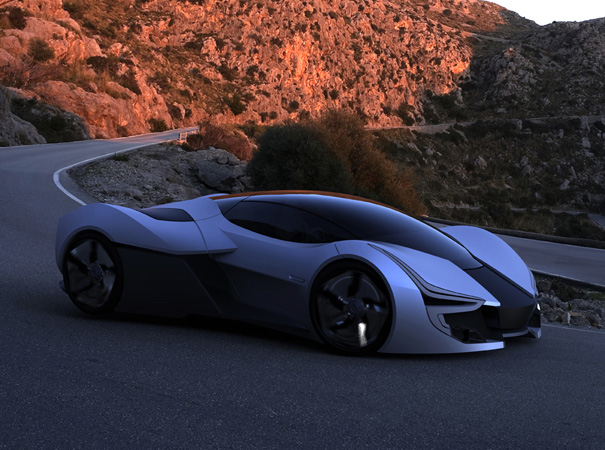
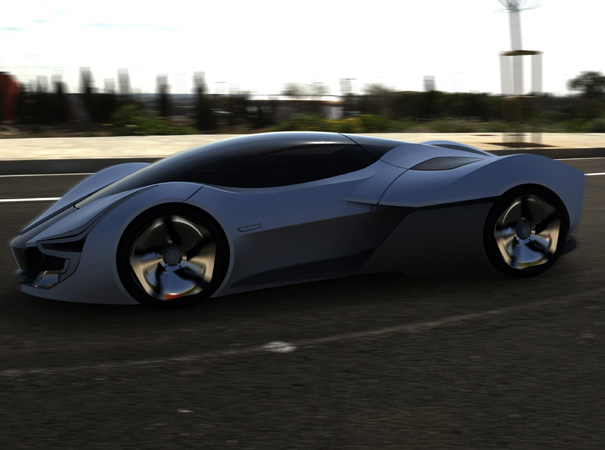
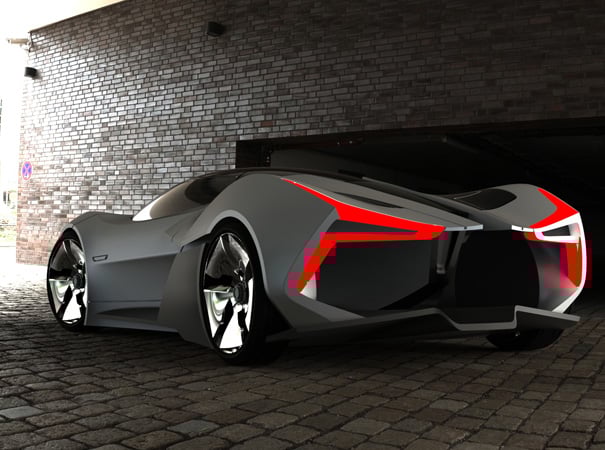
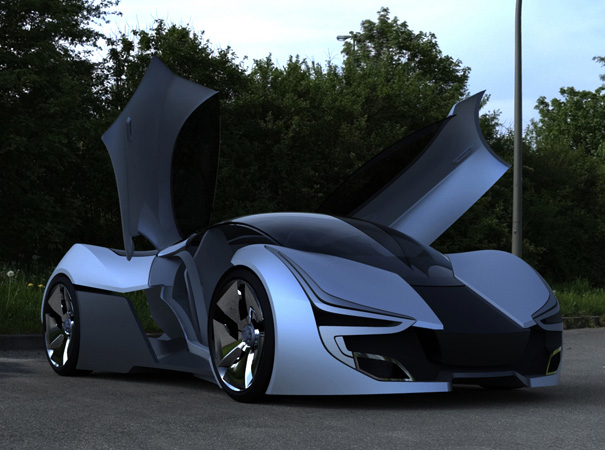
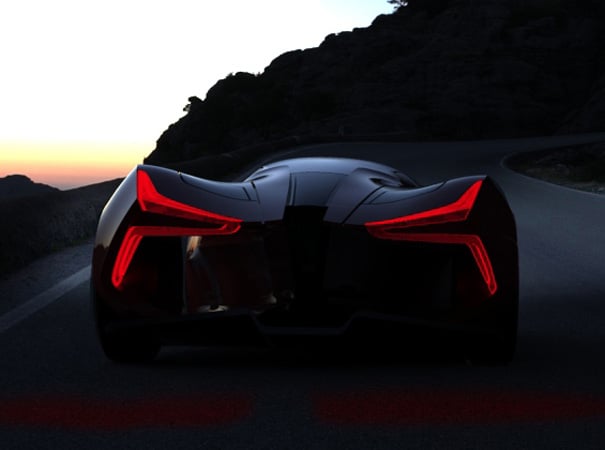
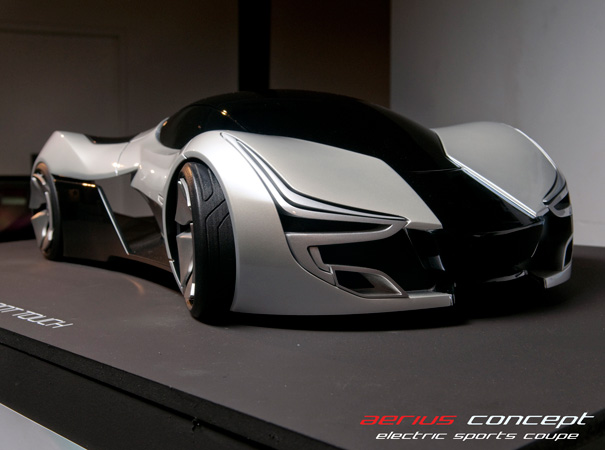
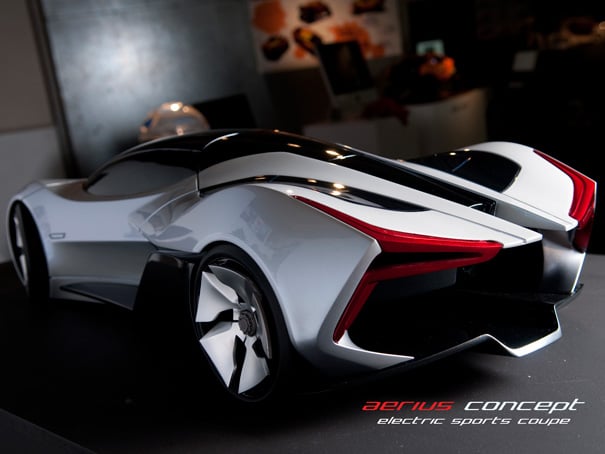
The Aerius concept is a high performance electric vehicle for 2025. The concept is combines the performance of race cars with emerging sustainable energy sources and materials. It’s driven by Michelin Active in-wheel electric motors at the rear and on-board electric motors in the front for instantaneous acceleration and agile handling. The aerodynamic body to reduces energy consumption and solar panels re-charge the carbon nanotube super-capacitors to extend its range while emitting zero carbons. Time travel will cost extra.

The form of the vehicle is heavily influenced by formula 1 race cars. The strong wheel arches hints at the four-wheel drive of the vehicle giving it a strongly planted road stance. The elegant clean glasshouse that runs the length of the vehicle represents the clean purity of the vehicle meaning zero emissions and the diffuser side blade links the whole aesthetic back to race cars.
Designer: Pei-Cheng (Patrick) Hsieh

Shared items